
- Key Takeaways
- Why These Updates Matter: What the Data Says
- 1. Generative AI Performance Reports
- What changed
- What it does not show
- How it helps businesses
- 2. The Search Generative AI Control
- What changed
- How it helps businesses
- 3. Platform Properties for Instagram, TikTok, X and YouTube
- What changed
- How it helps businesses
- 4. Web Multimodal Search Reporting
- What changed
- How it helps businesses
- 5. Combined Country and Device Filters
- What changed
- How it helps businesses
- The 2025 Features That Complete the Picture
- A Word of Caution: Data Delays
- How to Put the New Reports to Work: A 5-Step Plan
- Frequently Asked Questions
- What are the new Google Search Console features in 2026?
- Does Search Console show clicks from AI Overviews?
- Should my business turn off the Search generative AI control?
- Do I need a website to use platform properties?
- What does the multimodal filter in Search Console track?
- Sources
- About the Author
Featured Posts
Google Search Console Updates 2026: The New Reports Explained, and How They Help Businesses Grow
By Shraddha
published November 1, 2026

Google Search Console Updates 2026: The New Reports Explained, and How They Help Businesses Grow
By Shraddhanvita Tiwari, Content Strategist and SEO Lead | Reviewed by Ravi Adatrao, Marketing Strategist and President | Last updated: November 2, 2026
Key Takeaways
- Google made five major changes to Search Console reporting between June and October 2026, focused on AI search, social content, visual search and multi-market reporting.
- The new Generative AI performance reports, available to all sites since August 31, 2026, show for the first time how often your pages appear in AI Overviews, AI Mode and AI features in Discover.
- Platform properties let you track how your Instagram, TikTok, X and YouTube content performs on Google Search, Discover and News, with no website required.
- A new multimodal filter shows traffic from Google Lens, Circle to Search and image-based searches, and the Performance report now lets you combine several countries or devices in one view.
- These reports matter because the data shows AI Overviews reshape clicks. Seer Interactive found that brands cited in AI Overviews earned more than double the organic click-through rate of brands that were not cited.
For years, Google Search Console answered one main question: how does my website perform in the classic blue links? That is no longer the whole picture. Search now includes AI Overviews, conversational AI Mode, searches made with a phone camera, and social videos that rank alongside web pages.
In 2026, Google rebuilt large parts of Search Console reporting to reflect that reality. Below, we walk through every major reporting change, what each one shows, what it does not show, and how businesses can use the data to make better marketing decisions.
Why These Updates Matter: What the Data Says
Before getting into the new reports, it helps to understand why Google built them. The shift to AI search has changed how people click, and businesses have been flying blind on the AI side of that shift.
- AI Overviews reduce clicks to top results. An Ahrefs study of 300,000 keywords, published in February 2026, found AI Overviews correlate with a 58% lower click-through rate for the top-ranking page.
- Being cited changes the outcome. Seer Interactive's research found that when a brand was cited inside an AI Overview, its organic click-through rate was 1.2%, compared with 0.52% for brands that were not cited. Paid click-through rate showed the same pattern: 11.05% with a citation versus 4.14% without.
- Clicks are stabilizing, not disappearing. Seer's 2026 update, covering 53 brands, 5.47 million queries and 2.43 billion impressions, found organic click-through rates on AI Overview queries recovered from 1.3% in December 2025 to 2.4% in February 2026.
The takeaway for businesses: visibility inside AI answers now directly affects how much traffic you earn. Until this year, Search Console offered no clean way to measure that visibility. Our guide to zero-click searches and AI Overviews explains the wider shift in more detail.
1. Generative AI Performance Reports
What changed
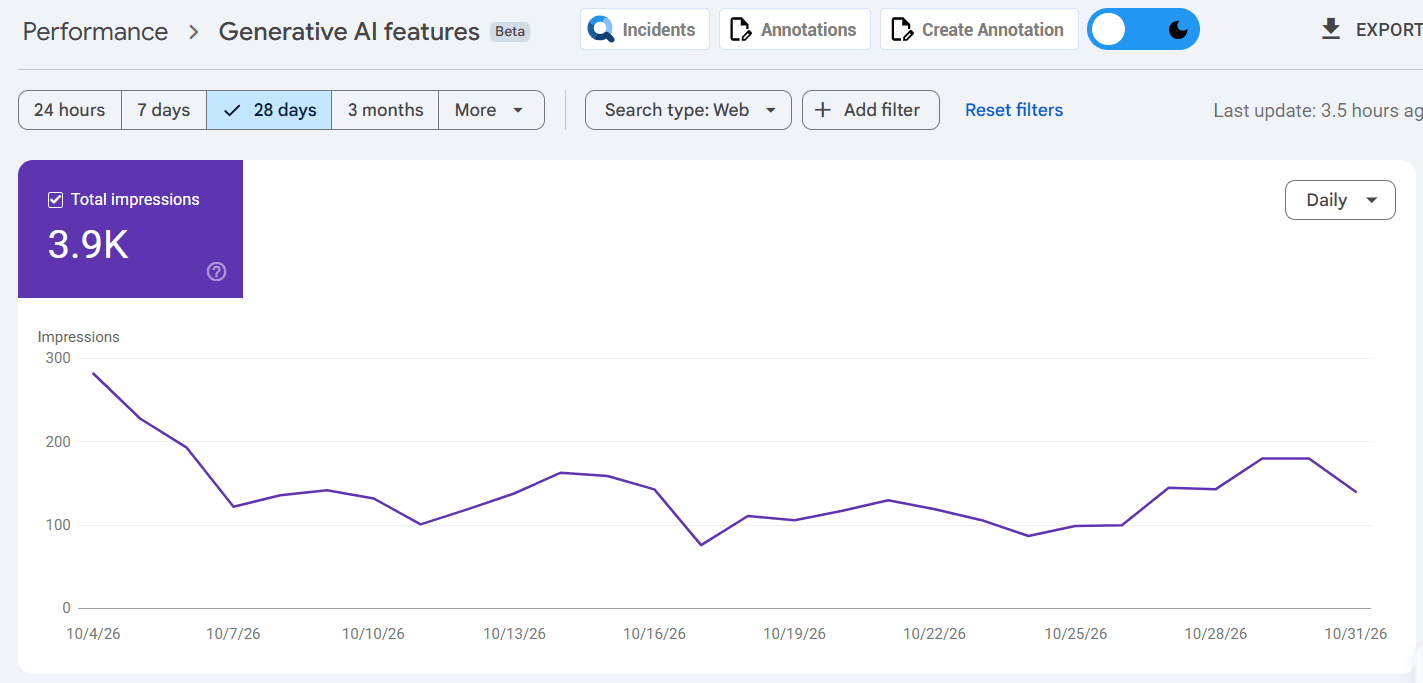
On June 3, 2026, Google introduced dedicated Search Generative AI performance reports in Search Console, with separate reports for Search and Discover. After a test period with a subset of sites, Google rolled them out to all websites worldwide on August 31, 2026.
The reports show how often URLs from your site appeared in generative AI features, including AI Overviews and AI Mode in Search and AI features in Discover. You can break the data down by page, country, device and date. This AI data is still included in your overall Performance report as well, but the new view isolates it for the first time.
What it does not show
The reports focus on impressions. They do not yet separate out clicks that came specifically from AI features. Google also notes that follow-up questions in AI Mode are treated as new queries, so a single conversation can generate several impressions.
How it helps businesses
- Find your AI-visible pages. The Pages view shows which URLs Google trusts enough to use in AI answers. These pages show you what kind of content works, so you can create more of it.
- Explain traffic changes to leadership. If impressions in AI features rise while clicks fall, you now have evidence that your brand is still visible, even when fewer people click through.
- Prioritize markets and devices. Country and device breakdowns show where AI visibility is strongest, which helps you decide where to focus content and paid budgets.
Search Console only covers Google's own AI features. To see how ChatGPT, Claude and Gemini treat your brand, pair it with an AI visibility tool such as GeoPulse. Read more in Does AI Visibility Drive Traffic and Leads?
2. The Search Generative AI Control
What changed
Alongside the new reports, Google added a toggle in Search Console that lets site owners decide whether their content can appear in, and help ground answers in, generative AI Search features such as AI Overviews, AI Mode and AI Overviews in Discover. Google first tested it with UK site owners in June 2026 and rolled it out to all sites worldwide on August 31, 2026. In late October 2026, Google added the control to its central documentation on managing what you share with Google Search.
Google says sites that opt out will not receive traffic or impressions from its generative AI features, and that the setting is not used as a ranking signal for regular search results.
How it helps businesses
For most businesses, opting out is not the right move. Given the citation data above, appearing in AI answers usually works in your favor. The control is most relevant to publishers and businesses whose content is the product itself, such as paid research, premium recipes or subscription news. If you are unsure, use the Generative AI report first to measure what you would be giving up before changing the setting.
3. Platform Properties for Instagram, TikTok, X and YouTube
What changed
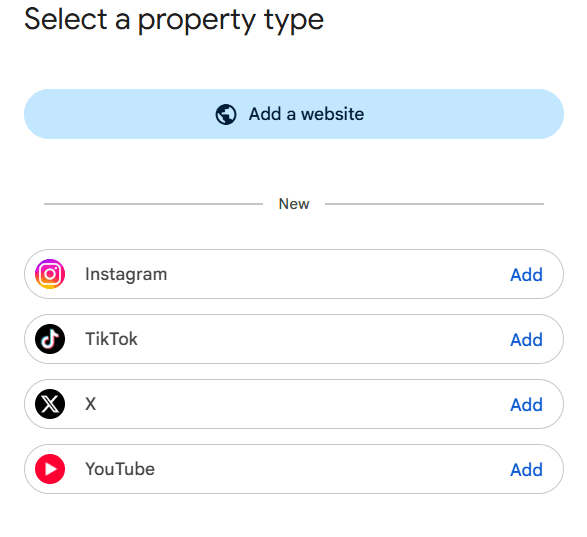
On July 7, 2026, Google introduced platform properties, a new Search Console property type for social and video accounts. It became available to everyone on July 29, 2026. You can now verify an Instagram, TikTok, X or YouTube account and see how its posts and videos perform on Google Search, Discover and Google News.
Platform properties include Performance, Insights and Achievements reports, similar to a website property. You can filter and sort by individual posts and search queries, and export the data. Crucially, you do not need to own a website to use them, because verification is done through the social account itself.
How it helps businesses
- Prove the search value of social content. Social teams can now show how many people found their videos and posts through Google, not just inside the app.
- Find content gaps. The query data shows what people searched for before landing on your social content. If a TikTok answers a question your website does not, that is a clear brief for a new page.
- Plan cross-channel content. Seeing website and social performance side by side helps you decide which topics belong on your site, which belong on video, and which need both.
One limitation: platform properties do not yet have a dedicated generative AI view, so you cannot isolate how social content performs inside AI features. For the bigger picture of social's role in brand building, see how social media is impacting brand equity in 2026.
Not sure what your Search Console data is telling you? Lean Summits' SEO team can audit your new AI, social and multimodal reports and turn them into a clear action plan. Book a free strategy call.
4. Web Multimodal Search Reporting
What changed
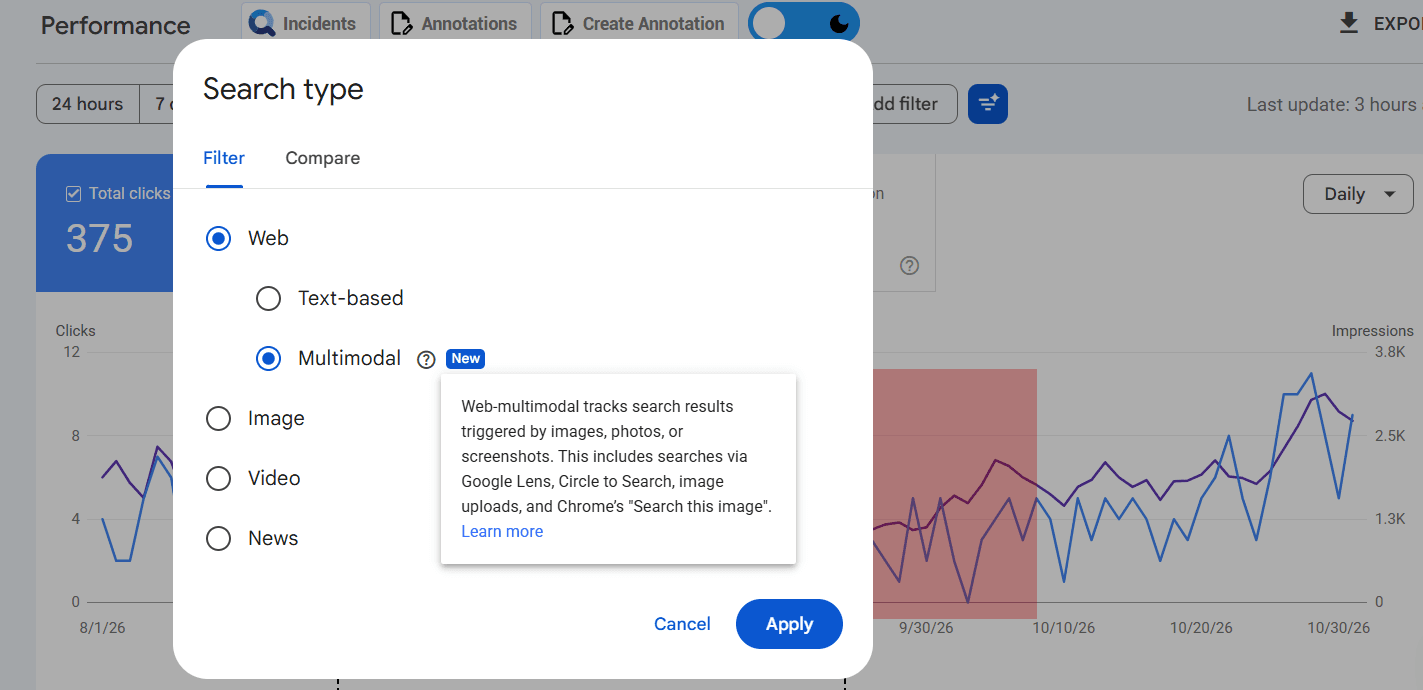
On September 24, 2026, Google began rolling out multimodal search reporting globally. A new "multimodal" search type filter now appears in both the Search results Performance report and the Generative AI report. It covers searches made with Google Lens, Circle to Search on Android, image uploads to Google Search, and Chrome's right-click "Search this image" option.
How it helps businesses
- Retail and ecommerce: Shoppers often photograph a product they see in a store or on social media to find where to buy it. The multimodal filter shows which product pages win that traffic.
- Home, fashion, food and travel brands: Visually driven categories can see whether their images are earning discovery, and which pages need better photos, alt text or product data.
- Local businesses: Restaurants, salons and venues can check whether people find them by searching photos of dishes, interiors or storefronts.
5. Combined Country and Device Filters
What changed
On October 6, 2026, Google updated the Performance report filters so you can select several countries or devices at once and see their combined data. Previously, you could only view one country at a time or compare two side by side. The Compare option still works with two items, and you still cannot filter by more than one search appearance at once.
How it helps businesses
This is a small change with a big time saving for any business that sells in several markets. A brand selling across North America can now view the US and Canada together, or a European business can group its core markets, without exporting data into a spreadsheet first. Regional reporting for leadership becomes a one-click task.
The 2025 Features That Complete the Picture
The 2026 updates build on several features Google added in late 2025. If you have not used them yet, they are worth setting up now.
- Branded queries filter (November 2025): Separates branded searches from non-branded ones, so you can see whether growth comes from people who already know you or from new audiences.
- Custom annotations (November 2025): Lets you mark events such as site launches, campaigns or algorithm updates directly on your Performance charts.
- AI-powered configuration (December 2025): An experimental feature that lets you describe the report you want in plain language and have Search Console set up the filters for you.
- Weekly and monthly views (December 2025): Smooths daily noise so you can see real trends more easily.
A Word of Caution: Data Delays
The new reports are powerful, but Search Console data is not always real time. In October 2026, the Performance report fell behind by more than 60 hours for many site owners before catching up the next day. Before reacting to a sudden drop, check the report's "last updated" time and Google's Search Status Dashboard. Using custom annotations to mark known delays and updates will keep your reports accurate over time.
How to Put the New Reports to Work: A 5-Step Plan
- Benchmark your AI visibility. Open the Generative AI report, set a three-month range and export your top pages. This is your baseline.
- Compare AI and classic performance. Look for pages with strong AI impressions but weak clicks. These are candidates for clearer calls to action, richer answers and better titles. Our Google AI Overviews SEO strategy covers how to improve them.
- Verify your social accounts. Add platform properties for every active brand account and review which queries bring people to your social content.
- Check your visual search traffic. Use the multimodal filter to find which pages earn Lens and image traffic, and improve images and product data on the pages that should.
- Report regionally and annotate everything. Use combined country filters for market reports and add annotations for campaigns and updates so your data tells a clear story.
If your site has technical issues holding back visibility, our technical SEO and AI search audit is a good place to start. For a broader look at how search is changing, read The State of SEO in 2026.
Turn Search Console data into growth. Lean Summits combines SEO and Generative Engine Optimization with AI visibility tracking across Google, ChatGPT, Claude and Gemini. Talk to our team about building a reporting setup that shows exactly where your traffic and leads come from.
Frequently Asked Questions
What are the new Google Search Console features in 2026?
The main 2026 additions are Generative AI performance reports for Search and Discover, a Search generative AI control toggle, platform properties for Instagram, TikTok, X and YouTube, a multimodal search type filter for image-based searches, and the ability to combine multiple countries or devices in the Performance report.
Does Search Console show clicks from AI Overviews?
Not separately. The Generative AI performance reports show impressions, pages, countries, devices and dates for AI features, but they do not isolate clicks that came specifically from AI Overviews or AI Mode. AI feature data is also included in your overall Performance report.
Should my business turn off the Search generative AI control?
For most businesses, no. Sites that opt out lose all traffic and impressions from Google's AI features, and research shows brands cited in AI Overviews earn higher click-through rates than those that are not. Opting out mainly makes sense for publishers whose content is their core product.
Do I need a website to use platform properties?
No. Platform properties are verified through the social or video account itself, so creators and brands can track how their Instagram, TikTok, X and YouTube content performs on Google without owning a website.
What does the multimodal filter in Search Console track?
It tracks searches made with images, including Google Lens, Circle to Search on Android, image uploads to Google Search, and Chrome's "Search this image" feature. The filter is available in both the Search results and Generative AI performance reports.
Sources
- Google Search Central: Introducing Search Generative AI performance reports in Search Console
- Google: New opportunities, control and insights for website owners
- Search Engine Land: AI performance reports and Search generative AI control rolling out globally
- Google Search Central: See how content from social and video platforms performs on Google Search
- Google Search Central: Platform properties roll out globally
- Google Search Central: Announcing web multimodal Search performance reporting
- Search Engine Journal: Search Console can now combine traffic from multiple countries
- Search Engine Roundtable: Search Console Performance report delayed (October 2026)
- Seer Interactive: AIO impact on Google CTR
- Seer Interactive: AIO impact on Google CTR, 2026 update
- Ahrefs study coverage: AI Overviews cut the top result's CTR by 58%
About the Author
Shraddhanvita Tiwari is the Content Strategist and SEO Lead at Lean Summits, where she builds search and AI visibility content programs for B2B and B2C brands. This article was reviewed for accuracy by Ravi Adatrao, Marketing Strategist and President of Lean Summits.
 Shraddha