
- What is ChatGPT Business Hub?
- Before you start: eligibility checklist
- How to register your business on ChatGPT Business Hub: step by step
- Step 1: Open Business Hub and sign in
- Step 2: Search for your business and select the match
- Step 3: Verify your claim
- Step 4: Complete the Persona identity check
- Step 5: Review and publish your profile
- If someone else already claimed your business
- After verification: get value from the hub
- Keep the profile accurate
- Connect a product feed (if you sell products)
- Read the insights correctly
- Business Agents: the next step for US ecommerce and online services
- Why Business Hub matters, industry by industry
- Common mistakes to avoid
- FAQ
- Is ChatGPT Business Hub free?
- Can businesses outside the US register?
- Does a verified profile guarantee ChatGPT will recommend me?
- Can I see what people asked ChatGPT about my business?
- Can an agency register on a client's behalf?
- Need help showing up in AI answers?
- Sources
Featured Posts
How to Register Your Business on ChatGPT Business Hub (2026 Guide)
By Shraddha
published November 17, 2026
On November 10, 2026, OpenAI opened Businesses in ChatGPT in beta. The centerpiece is Business Hub, a free dashboard where companies claim their listing, verify ownership, correct what ChatGPT says about them and see how often they come up in answers. OpenAI says ChatGPT now reaches 1.2 billion people every week.
If Google Business Profile shaped local search for the last decade, Business Hub is the first serious equivalent for AI answers. Buyers already ask ChatGPT which freight forwarder handles reefer loads, which CRM suits a 20-person sales team or which clinic near them takes walk-ins. Until now, businesses had no official way to influence the facts behind those answers.
This guide walks through the registration process step by step, explains who qualifies today, and covers what the hub means for different industries. If you are new to AI search, start with our beginner's guide to GEO, AEO and LLMO.
What is ChatGPT Business Hub?
Business Hub is OpenAI's management console for how a company appears inside ChatGPT. It lives at chatgpt.com/business-hub and in the ChatGPT web sidebar. Here is what it includes:
| Feature | What it does | Who gets it |
|---|---|---|
| Business profile | Your verified listing: name, website, description, category, logo, contact details, delivery and return policies | Eligible businesses in any market where ChatGPT is available |
| Product feeds | Send current prices and availability to ChatGPT via CSV, hosted URL or Shopify | Businesses that sell products |
| Insights | 28-day view of mentions, website clicks and discovery topics | Claimed, identity-verified businesses |
| Business Agents | A labeled AI agent that answers customer questions about your products or services | Eligible US ecommerce and online service businesses only |
Both the hub and Business Agents are free during the beta. Advertising in ChatGPT is billed separately, and OpenAI has not ruled out charging later.
One point matters for expectations: OpenAI says claiming a profile does not guarantee placement in ChatGPT's answers. The hub gives the model accurate facts about you. Whether you get recommended still depends on how well your brand is covered across the web, which is the work of generative engine optimization.
Before you start: eligibility checklist
Check these five things before you open the hub. Most failed claims trace back to one of them.
- Supported market. Your business operates in a country where ChatGPT is available. Online businesses can claim anywhere ChatGPT runs.
- Local businesses: an existing US listing. Local stores and restaurants can currently claim only a listing that already exists in the US. You cannot create a new local listing yet.
- Authority to represent the business. You are the owner or an authorized representative. Agencies may claim only for clients who have authorized them.
- Verification assets ready. Access to the business phone line, a business email on your domain, your domain's DNS settings or your Shopify admin.
- Identity documents. A government-issued ID, business registration details and proof you can act for the company, for the Persona identity check.
Two routes skip the self-serve flow. Existing OpenAI Enterprise customers and advertisers claim through their OpenAI representative. Shopify merchants can connect from Business Hub or install the ChatGPT app inside Shopify admin (Sales channels → Agentic → ChatGPT).
Before claiming, make sure your website, Google Business Profile and major directory listings show the same name, address, phone and category. Mismatches slow verification and confuse AI models.
How to register your business on ChatGPT Business Hub: step by step
The process has five steps, and most of the waiting happens during OpenAI's review. Screens may differ slightly by account, since the beta shows each business only the options it qualifies for.
Step 1: Open Business Hub and sign in
Go to chatgpt.com/business-hub, or open ChatGPT on the web and choose Business Hub in the left sidebar. Sign in with the ChatGPT account that will manage the listing. Use a company-controlled account, such as one tied to marketing@yourdomain.com, not a personal login that leaves with an employee.
Step 2: Search for your business and select the match
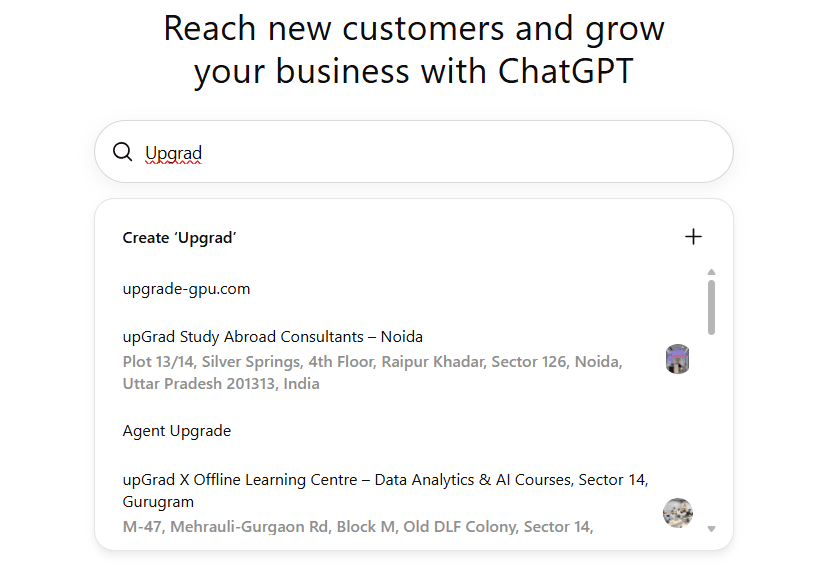
Search by your business name, pick the correct listing and confirm which ChatGPT account will manage it. Check the address and website carefully if your name is common. Online businesses can be added if they are eligible; local stores and restaurants must pick an existing US listing.
Step 3: Verify your claim
OpenAI offers one or more of these methods, depending on your business:
| Method | How it works | Best for |
|---|---|---|
| Phone | Choose SMS or call, select Get code, enter the code | Local businesses with a listed phone line |
| Business email | A code goes to an email address on your domain | Companies with domain-based email |
| Domain (DNS TXT) | Copy the TXT record name and value into your DNS, then select Verify domain | SaaS and online businesses without a public phone |
| Shopify | Select Connect Shopify, review permissions, log in | Shopify merchants |
DNS verification is usually the fastest route for SaaS and B2B companies. DNS changes can take a few minutes to a few hours to propagate, so leave the tab open and retry if it fails at first.
Step 4: Complete the Persona identity check
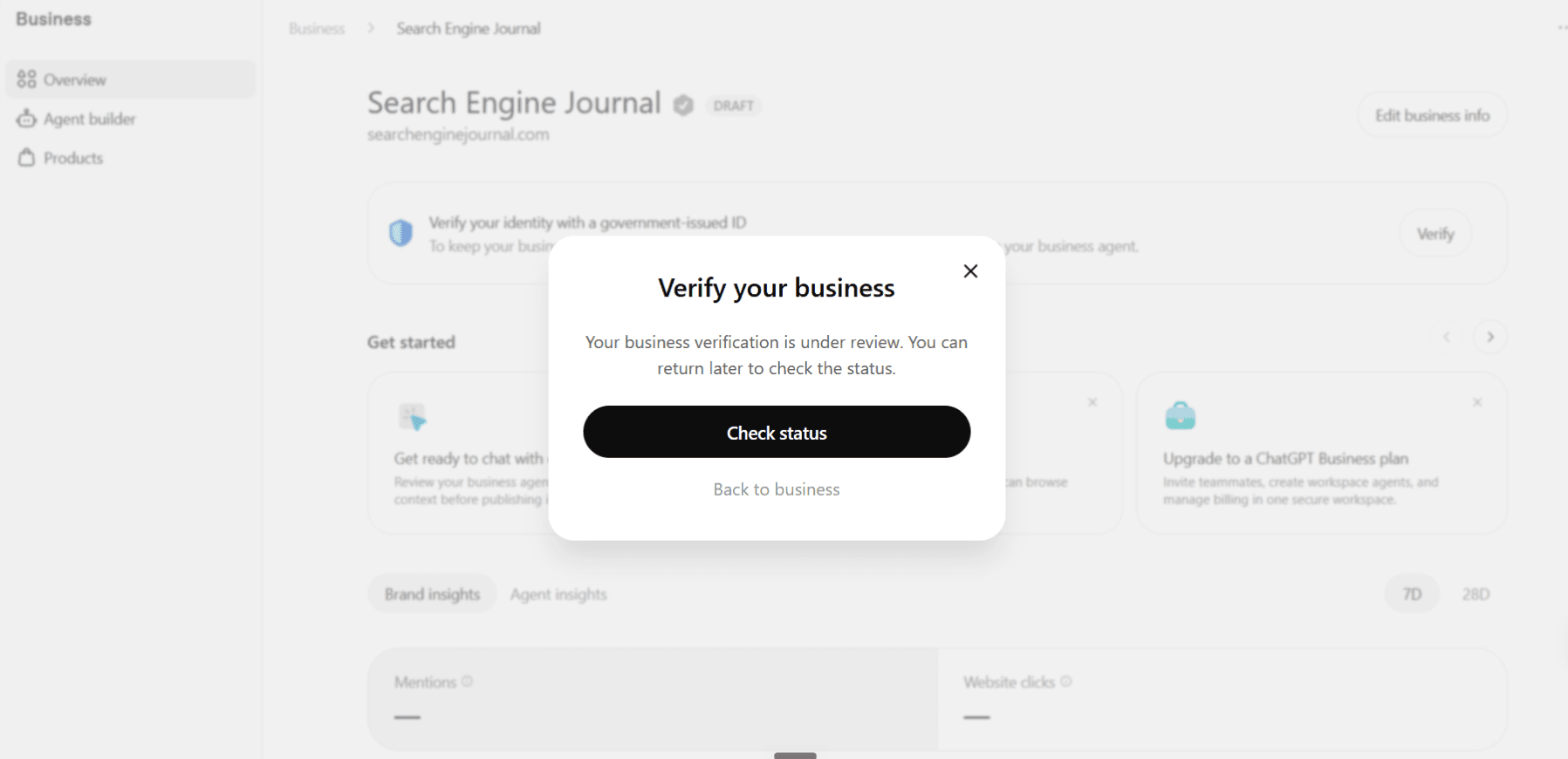
Claim verification proves you control the business. A separate identity step through Persona proves who you are. Select Verify with Persona, then Continue to Persona, and submit a government-issued ID, business registration details and proof that you can represent the company. If you stop midway, resume from the Business tab → your profile → Complete verification with Persona.
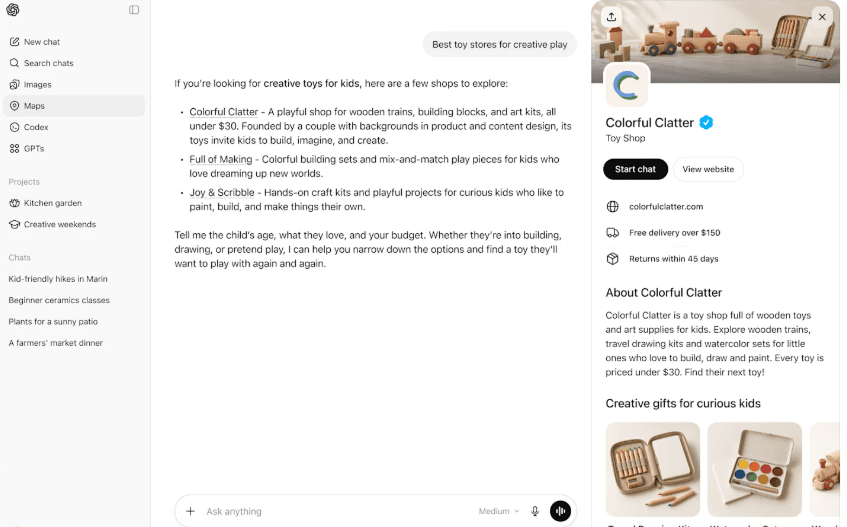
Approval adds a blue check to your profile. OpenAI emails a decision or asks for more information.
Step 5: Review and publish your profile
Once approved, update your trading name, legal name, domain, contact details, location or service area, description, category, logo, and delivery and return policies. Profile edits go through OpenAI review before they go live.
Treat publishing as permanent. OpenAI support cannot delete or unpublish a published profile; only unpublished drafts can be deleted. Proofread every field before approval.
If someone else already claimed your business
Open the profile menu, choose Dispute ownership and complete the Persona check. For a locked listing, contact OpenAI support.
After verification: get value from the hub
A claimed profile is the starting line. Three follow-up tasks decide whether it pays off.
Keep the profile accurate
Write the description the way a buyer would ask about you, not as a slogan. Name the services, the markets you serve and who you serve best. Add delivery and return policies even if they seem obvious, because ChatGPT answers those questions daily. The same principles behind structuring content for AI visibility apply here.
Connect a product feed (if you sell products)
Feeds keep prices and stock current in ChatGPT. You can upload a CSV, point to a hosted URL or connect Shopify. OpenAI's spec asks for nine basic fields: item_id, title, description, url, brand, seller_name, image_url, availability and price, plus target_countries and store_country. Include currency in the price, use stable variant IDs and public image URLs, and check rows against your live store before submitting. Eligible Shopify products already reach ChatGPT through Shopify Catalog.
Read the insights correctly
The insights panel covers the past 28 days:
- Mentions: times ChatGPT referenced your website in an answer. A brand name alone does not count.
- Website clicks: people who clicked through to your site. A click is not a lead or a sale.
- Discovery topics: themes from answers that mentioned or cited you. You never see individual prompts or conversations.
Blank numbers mean activity sits below OpenAI's privacy threshold or data is still being collected. Pair these numbers with your own analytics so you can tie AI visibility to traffic and leads, and use AI-driven attribution to credit the channel fairly.
Business Agents: the next step for US ecommerce and online services
Eligible US ecommerce and online service businesses can also build a Business Agent. It answers customer questions about products and services inside a separate, clearly labeled conversation, so users know they are talking to your brand rather than ChatGPT's independent assistant.
Keep the limits in mind:
- A verified profile, blue check or connected catalog does not make you eligible, and does not publish the agent. Publishing is its own approval stage.
- Agents cannot complete transactions, book appointments, look up orders or use plugins yet.
- OpenAI's Business Agents Policy holds you responsible for accurate, substantiated claims. OpenAI can suspend or remove an agent.
- Advertisers can also run sponsored agents as the destination for ChatGPT Ads.
Before launch, test the agent against real prices, product variants, return questions, delivery times and attempts to make it invent a discount. This is the same discipline we recommend for AI agents in campaign management.
Why Business Hub matters, industry by industry
The common thread is control. Before Business Hub, ChatGPT built its picture of your company from whatever it found: old directory entries, review sites, a competitor's comparison page. Now you can supply the facts directly, and see for the first time how often AI answers send people your way. Three shifts apply to every sector:
- Discovery is moving to questions. Buyers describe their problem in full sentences and get a shortlist back. We covered this in how search is becoming more conversational.
- Wrong facts now cost sales quietly. An outdated price, closed location or wrong service area in an AI answer loses the customer before they ever reach your site, much like zero-click searches.
- Early movers set the baseline. The beta is free and many competitors have not claimed yet. Clean, verified data now becomes the record ChatGPT relies on later.
| Industry | Why it matters | First move |
|---|---|---|
| B2C retail and ecommerce | Shoppers compare products in ChatGPT; feeds keep prices and stock correct, and US brands can add a Business Agent | Connect a product feed, then apply for Business Agents |
| Technology and SaaS | "Best tool for X" prompts shape shortlists; most SaaS firms lack a listed phone, so DNS verification is the easy path | Verify by DNS, then tighten category and positioning in the description |
| Logistics and supply chain | Shippers ask for carriers by lane, mode and equipment; vague service areas get you left out | List lanes, modes and regions served; see our GEO for logistics guide |
| Healthcare and medtech | Health answers carry high stakes, so verified, accurate details on services, locations and insurance matter more than reach | Audit every claim for accuracy; align with your AI-era content strategy |
| Food and beverage and restaurants | "Where should I eat" is a classic AI prompt; only existing US restaurant listings can be claimed today | Claim your US listing now; keep hours, menu links and local SEO consistent |
| Automotive and auto transport | Buyers research dealers, shippers and pricing in AI tools before calling | Claim the profile and match service areas to your local presence |
| Industrial manufacturing | Engineers use AI to find suppliers by capability, material and certification | Put capabilities, certifications and industries served in plain language |
| Legal and professional services | Clients ask ChatGPT for firms by practice area and city | Claim, verify and mirror the practice areas on your site; see SEO for lawyers |
Business Hub supplements your wider presence rather than replacing it. ChatGPT still draws on third-party sources, and unclaimed or outside information can still appear. A strong profile works best alongside the steps in getting AI search engines to cite your brand.
Common mistakes to avoid
- Claiming with a personal account. Ownership follows the login. Use a shared company account.
- Publishing before proofreading. Published profiles cannot be deleted by support.
- Inconsistent business data. A different name, phone or category on your site, Google profile and Business Hub weakens trust signals for every AI system.
- Treating the blue check as a ranking boost. Verification confirms facts. Recommendations still depend on reputation, reviews and technical AI-search readiness.
- Reading clicks as revenue. Track what happens after the click in your own analytics.
FAQ
Is ChatGPT Business Hub free?
Yes, during the beta. Ads are billed separately, and OpenAI may introduce charges later.
Can businesses outside the US register?
Online businesses can claim in any market where ChatGPT is available. Local stores and restaurants can currently claim only existing US listings, and Business Agents are US-only.
Does a verified profile guarantee ChatGPT will recommend me?
No. It makes your information accurate. Placement still depends on how well your brand is covered across trusted sources.
Can I see what people asked ChatGPT about my business?
No. You get aggregated mentions, clicks and discovery topics, shown only above a privacy threshold.
Can an agency register on a client's behalf?
Only with the client's authorization, and the Persona check still requires proof of authority to represent the business.
Need help showing up in AI answers?
Business Hub gives you a seat at the table. Being the business ChatGPT actually recommends takes consistent data, authoritative content and citations across the web. Lean Summits helps brands build that through AI SEO services and enterprise SEO. See how we did it for one client in our AI traffic growth case study, check whether your brand is AI-search ready, or talk to our team.
Sources
- Setting up your business on ChatGPT, OpenAI Help Center
- Introducing Businesses in ChatGPT, OpenAI
- Business Agents Policy, OpenAI
- OpenAI launches ChatGPT Business Hub for companies, IT Brief UK
- ChatGPT Business Hub, BrightLocal
- ChatGPT launches Google-like profiles for businesses, Nation's Restaurant News
- Claiming and verifying a business in ChatGPT Business Hub, Kingy AI
- Businesses in ChatGPT: how to claim your profile, BuildMVPFast
 Shraddha